
OpenCms CMIS-EFS-Eclipse-Plugin
This plugin is discontinued.
I wrote a little plugin to mount a CMIS folder as an EFS folder (Eclipse file system) in Eclipse. Well, to be honest, I just modified the one which you can find here, so most of the work was already done for me.
You can install the plugin by adding the following update site: http://www.johnen.biz/efs-cmis/.
The source code can be found here.
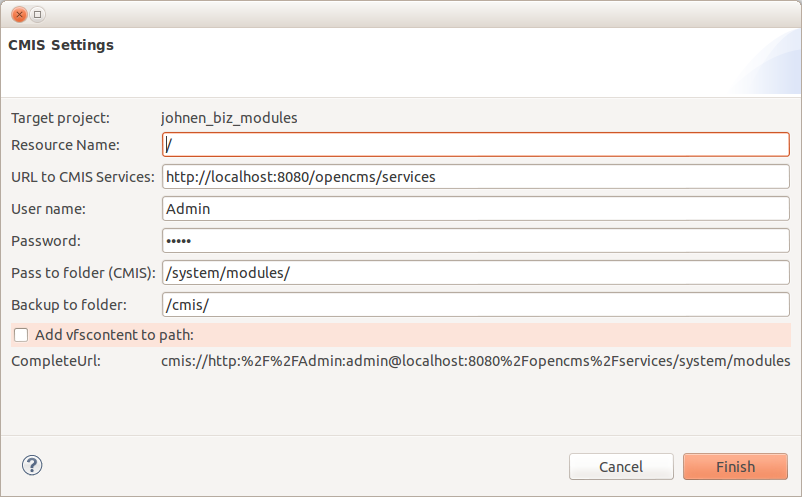
To mount a folder, you have to right-click on the root node(!) of your project and select New -> New CMIS Linked Resource. Then enter the parameters explained below.
Do you need support from a freelance developer on a Magnolia (CMS) or OpenCms project? Please refer to the footer for my contact details.
E
This is the folder where the resource will be mapped to in your workspace. It should not yet exist, but its parents should. When you want to map to the folder /cmis/modules/, the folder /cmis/ should already exist, the folder /cmis/folder/ shouldn't. The resources will be viewed as a folder in your workspace, but they will not be physically saved there, unless you configure a backup folder as shown below. If you use a versioning tool, add an "ignore" to this folder. Git has problems if I don't.
This should point to the servlet of the CMIS service. On an unaltered, local installation this is http://localhost:8080/opencms/services.
Default in OpenCms is "Admin", adjust if necessary.
The OpenCms default password "admin" is already set, adjust if necessary.
This is the CMIS folder mounted to the folder entered in "Resource Name". I usually map the complete /system/modules/ folder and afterwards set a resource filter in the workspace (right-click on the folder -> properties -> Resource -> Resource Filter) which matches my modules. You can also mount a content folder like /sites/yoursite/.
This is the folder, the contents of the mapped folder you will see in "Resource Name" will be backed up or copied to. So if you change a resource in "Resource Name", it will not only be changed in the VFS of OpenCms, but also a copy will be saved in this folder. I use this for versioning. Leave empty if you don't want a copy of the CMIS.
I like to use a modified version of OpenCms ANT Build that you can find here to deploy my modules via remote ssh to a live server. Check this box to follow the filepath convention used by OpenCms ANT Build, to save the backup, e.g. the JSP from CMIS folder
/system/modules/biz.johnen.opencms.jv8.article/formatters/detailAccordion.jsp
will be saved in the workspace as
/modules/biz.johnen.opencms.jv8.article/vfscontent/system/modules/biz.johnen.opencms.jv8.article/formatters/detailAccordion.jsp
instead of
/modules/biz.johnen.opencms.jv8.article/formatters/detailAccordion.jsp
This way I can use both modules together.
Comments